Showing posts with label LMS. Show all posts

Friday, January 31, 2014

Humboldt State's Moodle Office is Makes the News!

Humboldt State University
Humboldt State University (Photo credit: Wikipedia)
Our own inimitable Bill Bateman's video tutorials for Moodle 2.5 are featured at the Moodle News Website as were four of his videos for 2.3.

Bill is the lead Moodle Support Specialist in Humboldt State University's Moodle Office located on the third floor of the library. Bill's team manages the day-to-day operations of the learning management system, one-on-one student support, one-on-one faculty support as well as going out to faculty offices and classrooms. The Moodle Office is a good place to drop in for help and a cup of coffee. And if all that wasn't enough, Bill still takes the time to produce the video tutorials. The instructional design team and I rely on the Moodle Office pretty much on a daily basis.

Moodle News is the international hub for all things Moodle. It is the brainchild of Joseph Thibault a Course Manager at StraighterLine.com, and Mel Benson, a writer who runs Moodlerific.org, a site to share and explore Moodle ideas. She is also Moodle tech support for a school district Minnesota. Moodle News is a valuable resource for all things Moodle: it "is a collaborative project bringing order to news and information pertaining to the open source project and learning management system called Moodle. We scour the web for the freshest, most interesting and valuable Moodle information and publish it here."
Enhanced by Zemanta

Tuesday, August 13, 2013

Time Saving Tips for Teaching Online

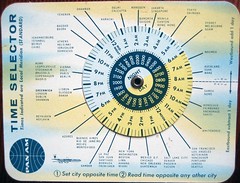
Time Selector
Time Selector (Photo credit: Telstar Logistics)
We often hear that online learning takes a lot of time for instructors. I have found that it can, but when a course is set up in advance to take advantage of a learning management system’s features, a lot of time can be saved. A little work and planning in advance can save teachers a lot of time when it will really count. Many of these techniques make for a more engaging experience for the students and make teaching online less stressful for instructors.

Note: this is an update of a post from 2012 that adds tips that teachers have sent in since then. Thanks everyone! Here are some of my favorite time-saving tips. Please add to them through the comments or via email.

1. Create a "Welcome Letter" that not only introduces the instructor and the course but gives detailed instructions on how to access the course and where to get help. Here is our example from DE 101.

2. Create a comprehensive syllabus. Utilize a "Week Zero," a module that explains to new students how to be an online student and use the learning management system (LMS). Direct students to tech support and the help desk as much as possible. Use the syllabus to let students know how to find tech support, tutoring, and a librarian. If your college does not provide online tutoring for students, be sure to check out OpenStudy which provides free, facilitated, online peer tutoring.

3. Use a syllabus quiz. Creating a quiz or syllabus scavenger hunt will help students understand how your course is organized and where to find help. I found this to be even more effective if it were worth a few points.

4. Make your course easy to navigate. Keep as much content as you can no more than two clicks away. Use a consistent format week-to-week or module-to-module. Remove buttons or tools you are not using.

 5. Schedule your time. Do not work on your online course because you can; work on it because you have scheduled the time. Let the students know your schedule. Access your course consistently (e.g. three times a week) and respond to email promptly (with-in 48 hours).

6. Be strict about forms of communication. If you give students multiple email and messaging accounts to contact you, be prepared for students to use them. Some instructors do not receive class related email but take course related questions only through the learning management system. Some will only use email. Some only take assignments in drop box. Make sure you are clear about how you want to be contacted.

7. Automate your course as much as possible. Take advantage of the time-release feature of announcements and other content. Record and reuse lectures. Let the learning management system handle as much of the grading as you can.

8. Distributing and exchanging documents. Use the assignment feature of your LMS instead of e-mail. Encourage students to share documents using Google Docs or Dropbox.

9. Centralize question and answers. Use a discussion forum for “Frequently Asked Questions.” Create a FAQ page. Ask students to ask questions in the forum rather than e-mail.

10. Use online groups with a deliverable Let the students do the work. Do not respond to every posting, respond to the group deliverable.

11. Use a "common responses" file to quickly paste in answers to common questions. This file can be a Google Docs file that you can open on any computer.

12. Allow students to facilitate online discussions. Giving students an opportunity to discuss what they have learned in their own voice can really help students learn.

13. Use a detailed grading rubric to help answer questions in advance.  Teachers can create rubrics online using tools like RubiStar.

14. Encourage student-student interaction and study groups. Give them the space to solve problems.

15. Communicate to entire class in general terms using audio and/or video on a regular basis. Try to anticipate problems or sticking points in a class and record a video to address these issues. We like to suggest tools like Screencast-o-Matic. A YouTube account is also very handy.

Bonus: There is a great resource from Dennis Thomas O'Connor, "Time Management Strategies for Online Instructors," that he sent to me in the last incarnation of this post.

What about you? How do you streamline your online teaching process? Leave a comment below if you have any time saving tips. 

Enhanced by Zemanta

Tuesday, October 25, 2011

Open Ed Conference: A Case Study of OER from within the LMS

Steam locomotive 6233 Duchess of Sutherland tenderImage via WikipediaSpeakers: John Rinderle, Bill Jerome
Can we increase OER uptake with seamless LMS integration?: Realizing opportunities for OER discoverability and data exchange in the LMS.

A key factor in OER uptake is the ability of resources to be easily accessed, combined with other course materials, and presented in an appropriate context for learning. For many instructors, the learning management system (LMS) is the information hub of their course. To extend the reach of OER we feel it is critical for resources to be made easily accessible from within the LMS. This need is greater than providing a simple link. From the LMS, OERs should be discoverable to students and instructors who want to use, support a single sign on interface, provide coherent navigation between LMS and OER, and seamlessly exchange key data (e.g. roster, grades, learning analytics).
In this presentation, we will share the Open Learning Initiative's approach to learning management system integration. We will survey current open standards for learning tools with the LMS and discuss our decision to implement Basic LTI (Learning Tools Interoperability). We will share our usability research on the user interface affordances required to drive a productive experience. We will also discuss the technical, user support, process and policy challenges we encountered while bringing OLI to the LMS.

Looking beyond OLI, we will make the case for improved methods and standards for integrating OER with LMS. While today's standards allow learning environment to report simple score outcomes to the LMS, the more robust measures of learning required to drive learning analytics remain locked up in individual tools. The result is that it is difficult to mix resources and achieve a unified view of how learning is progressing and the overall effectiveness of the learning design. We feel this is a missed opportunity. The next generation of standards and LMS systems will need to simplify the discovery and adoption of OER and facilitate finer grained data exchange.

Notes:
They are part of the Open Learning Initiative. They feel that the LMS is all about ease of access. Increasing access to education is part of their core mission. The LMS can make things easier to find. Without standards there are too many platforms to target otherwise. They did a survey and found that the LMS use is more complicated than they thought.  Basic LTI is available in all LMSs. They have a two-click to course content design. They are using Blackboard.

Challenges:
Technology issues
  • Some LMSs need extensions
  • Some implementations are buggy
  • Basic LTI has few required fields
Processes a Policy
  • Security 
  • Audit and control - knowing what tools faculty are using
  • Support - helping instructors
User Experience
  • Using complex systems is difficult for faculty and students
  • Bad experience = unhappy students
  • Roster management - there are two grade books
  • Single sign-on
  • Bookmarking  - basic LTI does not allow it
  • Desktop support
  • Where do users have accounts in OLI or in Blackboard?
Opportunities

Feedback Loops for Learning
Student learning data is at the heart of their solutions - an outcomes centered approach to teaching. They are creating tools for learning analytics. LMS interoperability and learning analytics should be automatic, not an afterthought.

How do we build a better user expereince?
An OER app store?

Pearson is moving in this direction using commercial and open content. 

The use experience needs to be focused on the educators and learners consuming OER.

Questions:
How does OER make greater in-roads to the LMS?
Do you agree with the app store approach?
What should an OER app store offer?
Does the app model extend or replace the content package?
Open and "closed," free and commercial. side by side?

The speaker is wondering why OERs are not moving like Web 2.0 projects - skunk works a project, release the API, then everyone uses it.

Enhanced by Zemanta

Saturday, August 27, 2011

Open Learning and the Next Generation LMS

Onderwijsdagen 2007 - Keynote - Stephen DownesImage by moqub via FlickrWe have been talking at work about what the next generation of LMSs (learning management systems) should look like. In the education blog world, LMSs are considered pretty old fashioned because they tend to be proprietary silos, built on old code (by committee), and do not empower students to facilitate their own learning. Once the class is over, the LMS shuts the door behind the student. We agree with all of that. We find it particularly hard to get really meaningful information in and out of most LMSs. We are all in favor of "personal learning networks" - the way LMSs generally attempt to integrate Web 2.0 or social networks is pretty laughable. It is usually misunderstood and bolted on as an after-thought. But LMSs can be important to institutions because they provide a consistent interface for students who may not have any experience with technology. I got the idea to email Stephen Downes about this because I have been reading his blog and newsletter since I have been involved in teaching and education. I asked him what he thought the next generation of LMSs would look like and he was gracious enough to send us this response:


"I guess my short answer to the query is that I think the future LMS will look like what gRSShopper will look like when it's done. Because I've been developing gRSShopper for the distributed and open model of learning for some time now, in other words, exactly where I think institutions should be going. Of course I'm not a great programmer so gRSShopper is far from complete. But it gives a bit of a model of what the future LMS should look like.

In particular, gRSShopper supports a distributed environment, This allows the institution to aggregate student content from wherever it's posted. gRSShopper also supports syndication. So content can be distributed by email or RSS into pretty much any environment. The idea is that the LMS isn't a destination that people have to visit, but rather a clearing house that manages content aggregation, indexing and redistribution.

This is what I've been building out on gRSShopper - but because web 2.0 has migrated away from standards and toward proprietary APIs I need to do a lot more to extend it. But any LMS should be working with remote content minimally with RSS/Atom, DC, LOM, iCal, FOAF, and various other standards, as well as the Google, Yahoo, Facebook, Twitter and related APIs. gRSShopper is a tool for managing things like MOOCs, and should support open online course content.

In addition, student access is ideally managed witgh a personal learning environment (PLE). This is a bit like a gRSShopper for idividuals, but with better management for personal accounts on remote systems. It would also have a more robust player - it would be a PLE that plays cartridges, not LMSs (though PLEs should report to LMSs any results). PLEs contain permanent records for student - all bookmarks, references and readings, created work, etc., is stored (or indexed, if stored in the cloud) locally, so the student can always retrieve it.

That's a short answer. A long answer would be consideraly more in-depth, but along these lines.
"


We would love to gather more ideas from others. If you have some thoughts on what you think the next generation LMS should look like or not look like, send us an email or leave a comment below.
Enhanced by Zemanta

Tuesday, February 15, 2011

PLNs: The Power of Personal Learning Networks

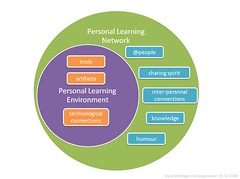
PLE as subset of PLNImage by catspyjamasnz via FlickrWhat is a PLN? I am not talking about the Polish Zloty but "personal learning networks" - the collection of links, tools, and people on the internet we use to support our teaching and learning. I have been reading some critical literature on "personal learning networks." We are seeing now the formalized study and analysis of informal learning networks (see some of the articles at the bottom of this posting). Why the interest? First of all, there is the growth of social networks like Twitter and Facebook. Students (and instructors) and connected in ways that were not possible even five years ago. Second, there is a power relationship inherent in traditional teaching that does not always make the classroom (online or off) the ideal place for learning, creativity, or innovation. The problem often comes from the idea that somehow the student is broken and needs to be fixed or contains a void that needs to be filled with a one-way dump of information. This is the "sage on the stage" model of teaching and learning. What often really happens is students attend a lecture and then talk to their friends, wikipedia, and Google to figure out what the teacher was talking about. This is a primitive personal learning network.

Interestingly enough, there is still a lot of language around PLNs that harken back to the one-way dump. This comes from instructors seeing new technology in terms of the old technology (e.g. the internet is a library). A PLN should not just be a place where one goes just to consult "experts." A true PLN requires participation and engagement. A PLN is a practice and a discipline just like traditional scholarship: it requires you to read, think, and create. In order for your PLN to be effective, you need to do four things:
  1. Link to others: Find the other participants in your field. Some will be "experts" and some will be participants just like yourself. If you are in education, for instance, there are many lists of educators in twitter. Link to people with opinions and ideas different from your own.
  2. Ask questions: Post questions. The wider your network, the wider variety of answers you will find.
  3. Share: Share ideas that you have found in your network with others. Share your bookmarks in Delicious and what you are reading on your blog. Share other people; let others know about your network and and recommend people and sources of information.
  4. Answer questions: Offer solutions or help others find the means to answer questions.
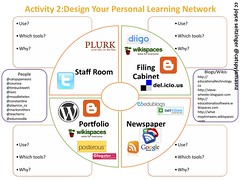
4 Faces of Personal Learning Network (Activity)Image by catspyjamasnz via FlickrYou can see from the list above, that as simple as it is, there is a lot going on. It would be just as big a mistake to abandon a traditional learning management system and just adopt PLNs as an answer as it would be to adopt an LMS and not sufficiently train students in its use. All of the skills around critical thinking and evaluating sources come into play here.We need a curriculum that teaches students how to make choices about who they are connecting to and why. Critical thinking skills around networks needs to be explored. Teaching and modeling technologies for sharing are also a part of this.These are critical skills in the community college, and we are still using early computer curriculum to show students how to use software that won't exist in two years.

In the right-hand side-bar of this blog is are some links to the HIM 101 class that I co-taught with Charlene Gore at Tacoma Community College. It includes a map of how we used Twitter in the class that I think represents an interesting use of Twitter as a PLN.
    Enhanced by Zemanta