Showing posts with label Accessibility. Show all posts

Tuesday, October 22, 2013

Biology eAcademy: Course Accessibility and Universal Design

English: Braille laptop. Universal Learning De...
Presented by Brett Cristie - Lets talk about Universal Design for Learning because we are talking about course redesign.

Accessible Technology Initiative
From a Jan. 1, 2006:

"Information Technology Procurement and Accessibility for Individuals with Disabilities"

Instructional Materials Accessibility

Are My Course Materials Accessible?
Your syllabus is the gateway, it should serve as a map and compass
If not accessible, some students will be at a disadvantage

There are simple things that you can do to make things in your course more accessible (using styles, etc.).
Textbooks and course readers should be accessible
Video and audio resources need to be captioned or transcribed
Library electronic reserves and internet resources that are used in classes should be accessible
Learning management systems - the ones that that we use are all basically accessible.

We have a state-wide contract with AutoSync that brings down the captioning cost to $1.35 a minute.

We have resources at at the Chancellor's offce here: http://teachingcommons.cdl.edu/access/ and on Universal Design for Learnin ghere: http://udluniverse.com

Enhanced by Zemanta

Sunday, May 01, 2011

Peru: Access to the internet is a fundamental human right

The Macchu Picchu, a UNESCO World Heritage Sit...Image via Wikipedia
This is what we should really be talking about when we are still addressing issues of "digital divide." The full Peruvian House approved a bill that declares as a fundamental right and free unrestricted access to the services of Internet . The same proposal provides for the massification of broadband service, especially in rural areas and places of preferential social interest.
APRA lawmaker Mauricio Mulder was the one who drove in the last minute of the debate that network access is unrestricted and free, and stated that this proposal was endorsed by the Executive.
Therefore, the chairman of the Committee on Transport, Yaneth Cajahuanca (Nationalist Party ), considered as approved will not be noticed, but adopted by the Executive. Freely interpreted it would mean that people stop paying rates, but will not solve the infrastructure for broadband.
He explained that the main purpose of the adopted is to increase coverage of telecommunication backbone networks, high-capacity nationwide and encourage investment in fiber optic networks and service delivery of broadband communications.
According to the Ministry of Transportation and Communications (MTC), there is a 3% penetration of broadband connections, a rate that leaves us far behind in comparison with neighboring countries.
At the request of Congressman Yonhy Lescano (AP) 28900 Act was amended the Investment in Telecom (Fitel), in order that the resources of that body come from, among others, 1% of revenue billed and reported by telecommunications operating companies. The current standard builds on revenue billed and collected, which is a lower amount.
Cajahuanca lawmaker said in that 1% is also included billing for cable television, not before contemplated.
He noted that the Fitel will no longer be an administrative body, it will become a sectoral technical body, so to replace Pro Investment concessions delivery of broadband to expedite the process.

Enhanced by Zemanta

Thursday, February 24, 2011

Jing: ADA Compliance and New Media

Jing logoImage via WikipediaJing's pro version now includes the ability to add captions. I want to congratulate them on that. No, I want to send them an award or something. I owe them all a College of the Redwoods keyring at the next conference I go to. We use Jing a lot in my department. Jing is a great screen capture tool that captures images and videos of what you are doing on the screen and allows you to voice over at the same time. This is incredibly useful in training materials. The screen capture function lets you insert comments and highlights. If that wasn't enough, it includes a free "Screen Cast" account to store all your images and Flash videos that provides a link and an embed code for all your files. All this for $15 bucks a year. The missing piece was captions. It is against the law to use these videos for student instruction of any kind without captions. There are too many web 2.0 widgets out there that are not compliant. Every day, my Google Reader and email is filled with the latest tool that is supposed to solve all my problems and they are built by programmers who have no understanding of ADA 508 or the legal issues involved around accessibility. I go on Twitter and instructional designers are touting some wonder widget that has no place in education because it is not accessible. Are we still fighting this fight? You can't buy non-compliant software with federal funds and yes, check your state guidelines too. Often, greed is the only thing standing in the way. If a company uses a picture of a table (with no alt tags) instead of a table of data, screen readers cannot see it and the software should not be purchased. Those of you who read this blog know that I choose software carefully and lean heavily towards open source but this is a very useful tool that has now increased its accessibility and they are rewarded with my business. Bravo!

I talked to a salesman recently who said that his company was going to sell non-compliant software because it was not financially viable for them to make it so. We can make it so by knowing the law. How financially viable is it to lose a sale because you don't care about accessibility? The more I learn about accessibility, the more I am discovering that it is laziness and greed keep some companies back.  There is 2 billion dollars of DOL money out there for education and your going to NOT make you work accessible??
Enhanced by Zemanta

Sunday, January 30, 2011

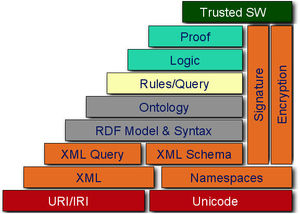
The Semantic Web and Universal Design

W3c semantic web stackImage via WikipediaI have been looking at PopcornJS this morning. PopcornJS allows programmers to build in triggerable events in the code delivering a video in a webpage. What problems does that solve? One of the things we are wrestling with at the college is accessibility. According to ADA 508, all videos have to be captioned. We have grants for captioning videos. I have always thought that we should be doing more. If we follow the principles of Universal Design, we are not only making media accessible, but we are crafting learning modules and objects for their maximum interactivity and, what I feel is the next step, connectivity. Videos and other learning content represent another opportunity to link students to subject matter experts and other students. We can integrate learning modules with knowledge networks. One avenue of exploration is HTML5 and the semantic web. We can do more than just caption videos - we can take the metadata, the code in that accompanies the video and package it with a transcript of the video to trigger events and things like live links to Twitter, Flickr, Google Maps & Translate, Wikipedia, etc. PopcornJS is the code that will allow us to do this. There is an interesting page and demo on PopcornJS.

This is what the internet should be doing. There are too many tools like this available for us to accept content from publishers that is not accessible. Publishers will often supply textbooks and supplementary content that does not meet ADA guidelines. Educators and instructional designers should be taking the lead in the colleges using techniques like PopcornJS and not waiting for the commercial publishers to catch up. They have no interest in meeting ADA guidelines because they are not the ones that have to deal with the consequences. In my quest to make the internet a happier, shinier place, I am not calling for a boycott of those companies but suggesting a solution. Colleges could pool their resources (programmers, beta-testers, and content creators) to help move this project along much in the same way the Sakai project is supported. The commercial uses for something like PopcornJS are obvious - someone looks up and watches a surfing video in YouTube. The video opens in a page with a map of the area where the video was filmed, a link to the TripAdvisor page on the area, the Twitter feed about the surf from the locals, and of course, more targeted marketing. But imagine taking that page as a teacher or instructional designer and building in other learning modules, maps, translations and connections.

Colleges should be setting the standards for media and the semantic web to, at minimum, ensure accessibility. We should go farther and develop guidelines for content around interactivity and connectivity. The semantic web and projects like PopcornJS represent another opportunity to open up education. What do we call these? Semantic knowledge guidelines?
Enhanced by Zemanta